|
Ransomware Protection – is a new module included in all Bitdefender 2016 classic line products (Antivirus Plus, Internet Security and Total Security) and it is designed to protect certain folders from ransomware malware that infects client’s PC’s, encrypts personal files, making them unusable and demand money in exchange.  Ransomware malware - is a malicious software that attacks vulnerable systems by locking them, and asks for money to let the user take back the control of his system. The malicious software displays false messages to panic the user, urging him to proceed with the asked payment. Ransomware can have one of the following behaviors: Ø Encrypts sensitive and personal files without giving the possibility of decryption until a ransom is paid by the victim. Ø Locksthe computer’s screen and displays a message asking for money. In this case, no file is encrypted, only the user is forced to proceed with the payment. Ø Blocks applications from running. Using the latest technology, Bitdefender Ransomware Protection ensures system integrity by protecting critical system areas against damages without impacting the system. Boot time ProtectionGiven the fact that many malware applications are set to run at system start-up, Boot time protection scans all critical system areas before all files are being loaded, with zero impact on the system. At the same time, protection is provided from certain attacks that rely on malware code execution, code injections or hooks inside certain core dynamic libraries. Folders that are protected by default: Ø Documents - both User and Public Ø Pictures - both User and Public Ø Custom folders (defined by the user) Ø Cloud storage folders (for most popular online storage) - Dropbox, Box, OneDrive, Google Drive Documents and Pictures will be protected for each Windows user. 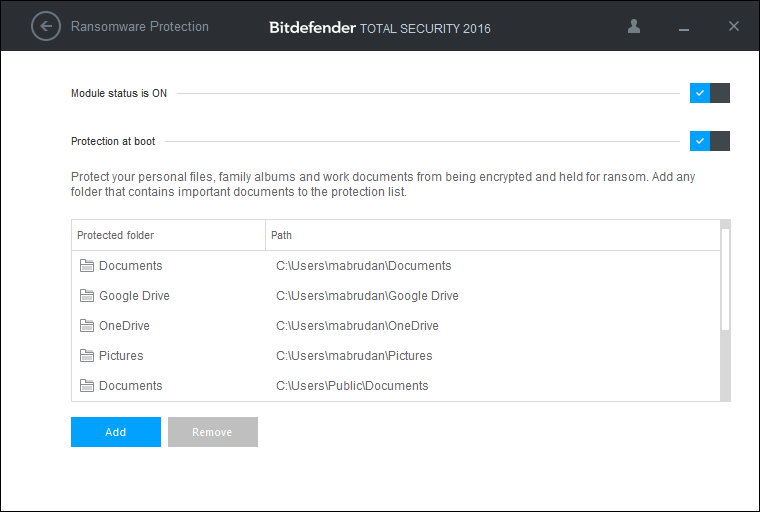 NOTE : Custom folders can be protected only for current users. System and applicationfiles cannot be added to exceptions.
How to configure trusted applications In order to disable ransomware protection for specific applications, you have to be careful to add only the apps you actually trust. To add trusted applications to exclusions, follow these steps: 1. Click the icon in the lower-left corner of the Bitdefender interface. 2. Select the Protection tab. 3. Under the Ransomware Protection module, select Trusted applications. 4. Click Add and browse to the applications you want to protect. 5. Click OK to add the selected application to the protection environment. How to configure blocked applications Among the applications you have installed on your computer, some may want to access your personal files. To restrict those applications, follow these steps: 1. Click the icon in the lower-left corner of the Bitdefender interface. 2. Select the Protection tab. 3. Under the Ransomware Protection module, select Blocked applications. 4. Click Add and browse to the applications you want to restrict. 5. Click OK to add the selected application to the restricted list. NOTE: In case Ransomware Protection blocks a legitimate application, a warning message will also appear in the lower left corner of the screen; thus providing the user with the possibility to include that program to the trusted application list (if the message disappears, the steps above should be followed to add that application to the trusted application list). Comments are closed.
|
Protect from RansomwareBuy Bitdefender now 
RECOMMENDED READINGs
All
|
 RSS Feed


For BUSINESS: Gravityzone Advanced Business Security
We are a certified Sales Partner (more than 8 years), not principal
Copyright © 2024 We are a Gold Partner of Bitdefender.
Website managed by 57Network.com